Turn years of email into court-ready evidence
A free Windows app. Bring in your email, filter it down to the messages that matter, and get one clean evidence file. Pro turns them into numbered PDF exhibits. Everything stays on your computer.
Link copied. Paste it into an email or a note to yourself, then open it on your Windows computer.
Your download has started. Open the file when it finishes, and CaseRelief installs in a few seconds. Install help
Windows 10 and 11
You've been putting this off. Not because you're lazy.
The evidence is in your inbox. Hundreds of emails. Maybe thousands. Spread across years. Custody, small claims, an eviction, a fight with your employer. The story is the same: the proof exists. It's just buried.
So you've tried. Copy-pasting into a document. Printing screenshots. It eats your evenings, and it still doesn't look like something a court would take seriously. Digging it all out feels impossible.
It isn't.
Years of email. One sitting.
How it works
See it in action
What you get
A structured evidence fileFree
One file. Every email that matters. In order.
Every matching message, in one clean file. Dates, senders, and full reply threads preserved. Attachments read and included. Even scanned PDFs: if the attachment is a picture of paper, CaseRelief reads the text off the page.
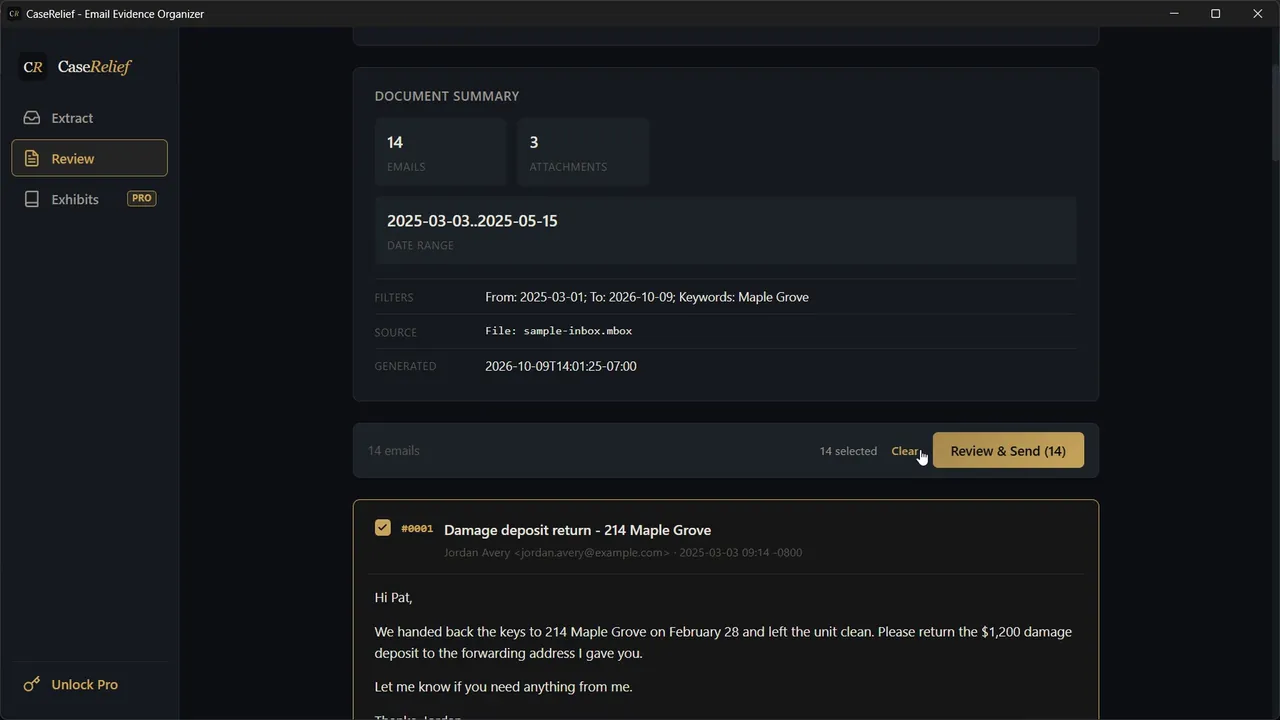
Try the Review screen in your browser, with a fictional sample inbox.
Read it yourself. Print it. Hand it to a legal aid clinic. It's also built to work with AI tools: if you use ChatGPT, Claude, or anything similar, give it the file and ask questions in plain English.
Like having a paralegal who's read everything and remembers all of it. Use any AI, or none at all.
Court-ready PDF exhibitsPro
Numbered. Dated. Ready to file.
This is what you hand a judge. Organize your selected emails into binders. CaseRelief numbers each exhibit (1, 2, 3 or A, B, C). It builds a cover index. It formats every message as a clean printed page. It stamps each page with its source and the date you pulled it, so every exhibit traces straight back to the original email. The whole binder exports as a single PDF.
No more screenshots. No more copy-pasting into Word. No more wondering if the court will accept it.
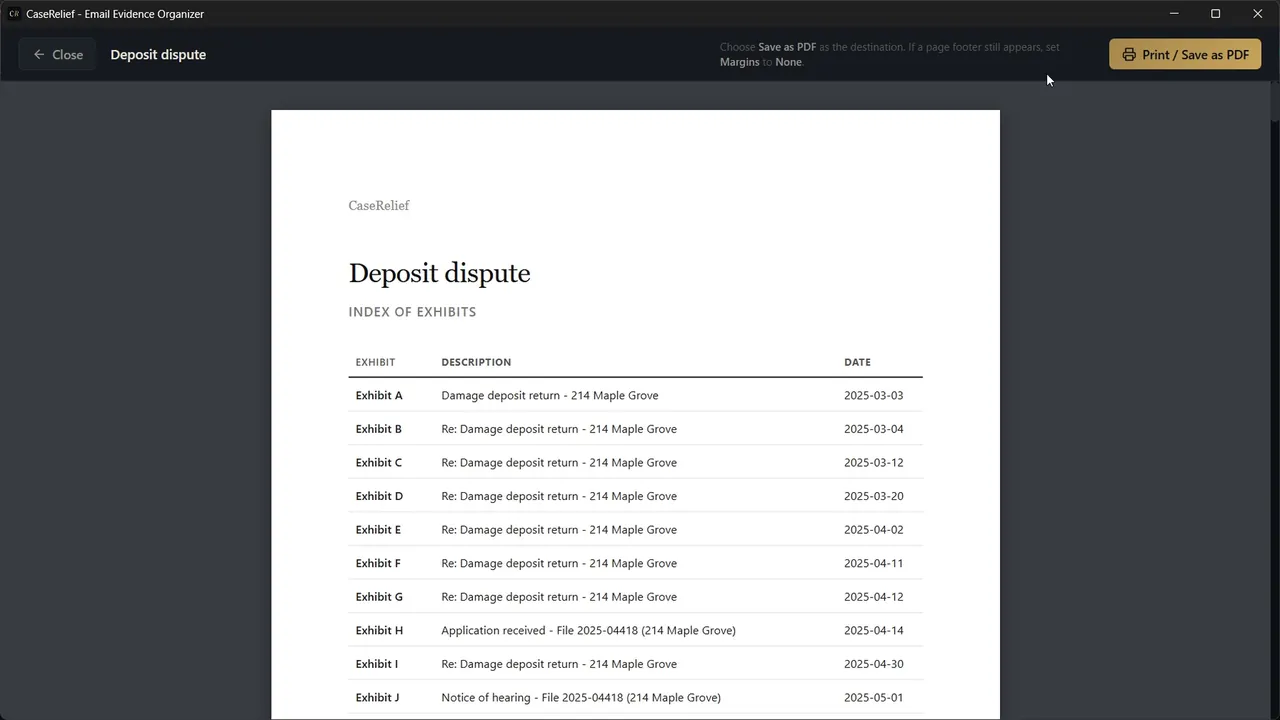
Try the Exhibit Builder in your browser, or see a whole sample binder (PDF, 12 pages).
What are you working on?
For legal professionals
CaseRelief was built for people representing themselves. It holds up just as well in an office. The same file gives a paralegal or an attorney the complete email record, in order, in minutes. Good enough for a lawyer. Built for someone who couldn't afford one.
Pricing
- Import from a live account or a file
- Filter by date, person, direction, keywords
- Review, search, and select emails
- Export text files
- Organize emails into binders with auto-numbering
- Generate a cover index for each binder
- Source and date stamped on every page
- Export court-ready PDF exhibits
Your key arrives by email right away. Paste it into the free app to unlock.
One-time purchase. Full refund within 30 days if you haven't activated it; after activating, a refund if it doesn't work as described.
Your data stays yours
Web tools ask you to upload your inbox. CaseRelief never does. The file it makes is yours, on your computer. Share it with a lawyer, an AI, or no one. Your case, your call. And because you filtered it, you share the thread that matters. Not your whole inbox.
Try it free
Download CaseRelief for Windows. The evidence file is free. Court-ready exhibits are a one-time $79 unlock inside the app, there when you're ready for them.
Free to download · Windows 10 and 11 · Also on the Microsoft Store
Common questions
Do I need to use AI?
No. The evidence file is complete on its own: organized, chronological, printable. You can also give it to any AI and ask questions about your case.
Will a court accept this?
Courts accept email evidence every day. What matters is that it's complete, legible, and traceable. CaseRelief keeps full reply chains, stamps every exhibit page with its source and extraction date, and numbers exhibits the way courts expect. Filing rules vary by court, so check your local requirements. CaseRelief organizes evidence; it doesn't give legal advice.
Can't I just print my emails myself?
You can. People do. It means printing or screenshotting each message one at a time, numbering pages by hand, and building an index in Word. That's the job that eats your evenings. CaseRelief exists to replace it.
Which email providers work?
Gmail, Outlook and Microsoft 365, iCloud, Yahoo, and any IMAP provider. You don't need a live account at all: drop in a Gmail Takeout .mbox, .eml files, or a .zip and work from that.
Is there a Mac version?
Not yet. CaseRelief runs on Windows 10 and 11. Mac will follow if enough people ask.
Built by someone who needed it. I'm a self-represented litigant. I spent too many late nights scrolling through years of email, hunting for the messages that proved my point. Then more nights trying to turn them into something a court would accept. CaseRelief is the tool I wished existed. Now it does.